






Free public beta

Your head can rest.

Alter remembers what was decided, keeps your notes in order and asks before anything leaves your machine.

Free during the public beta. Apple Silicon and Intel Macs, and Linux.

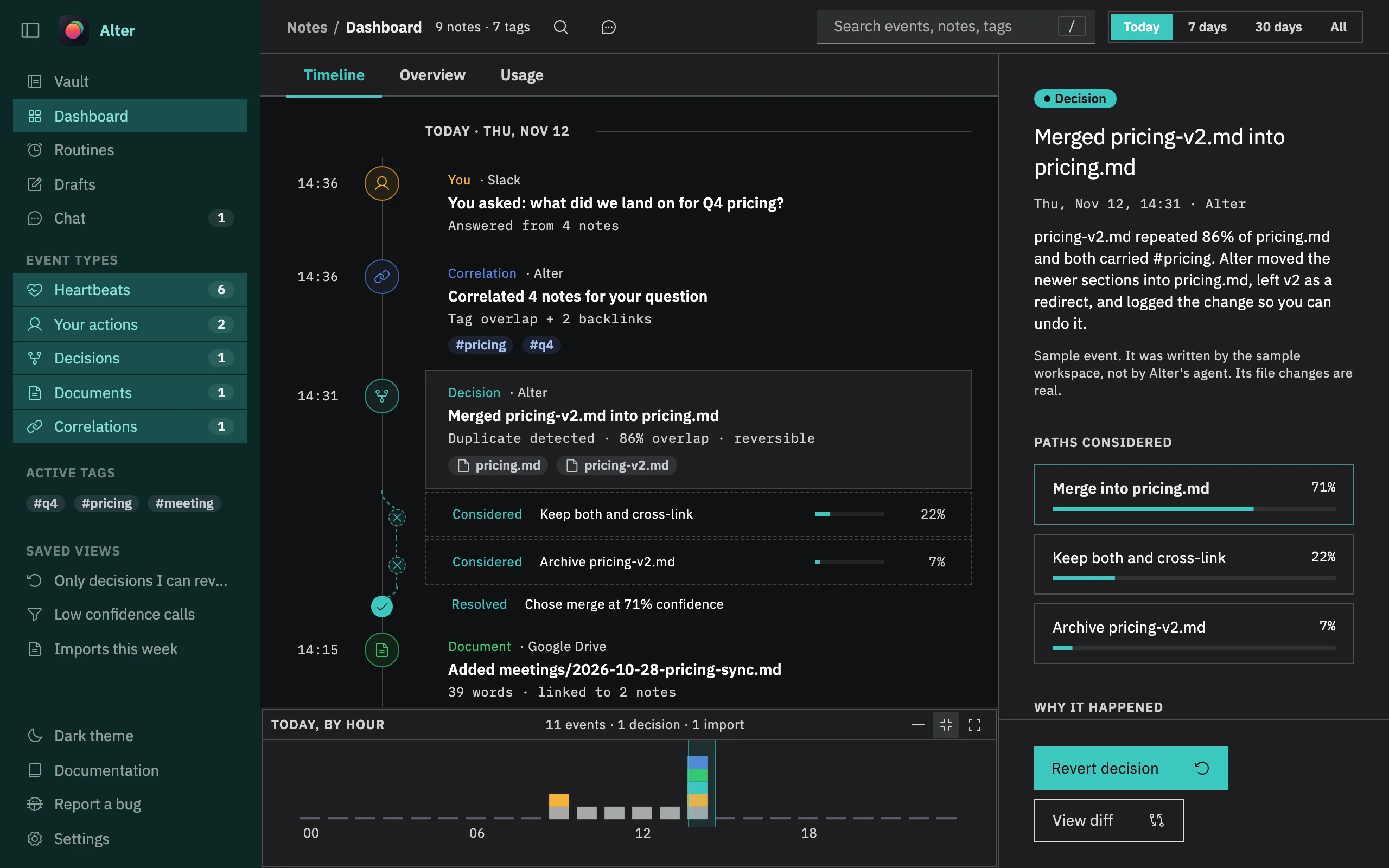
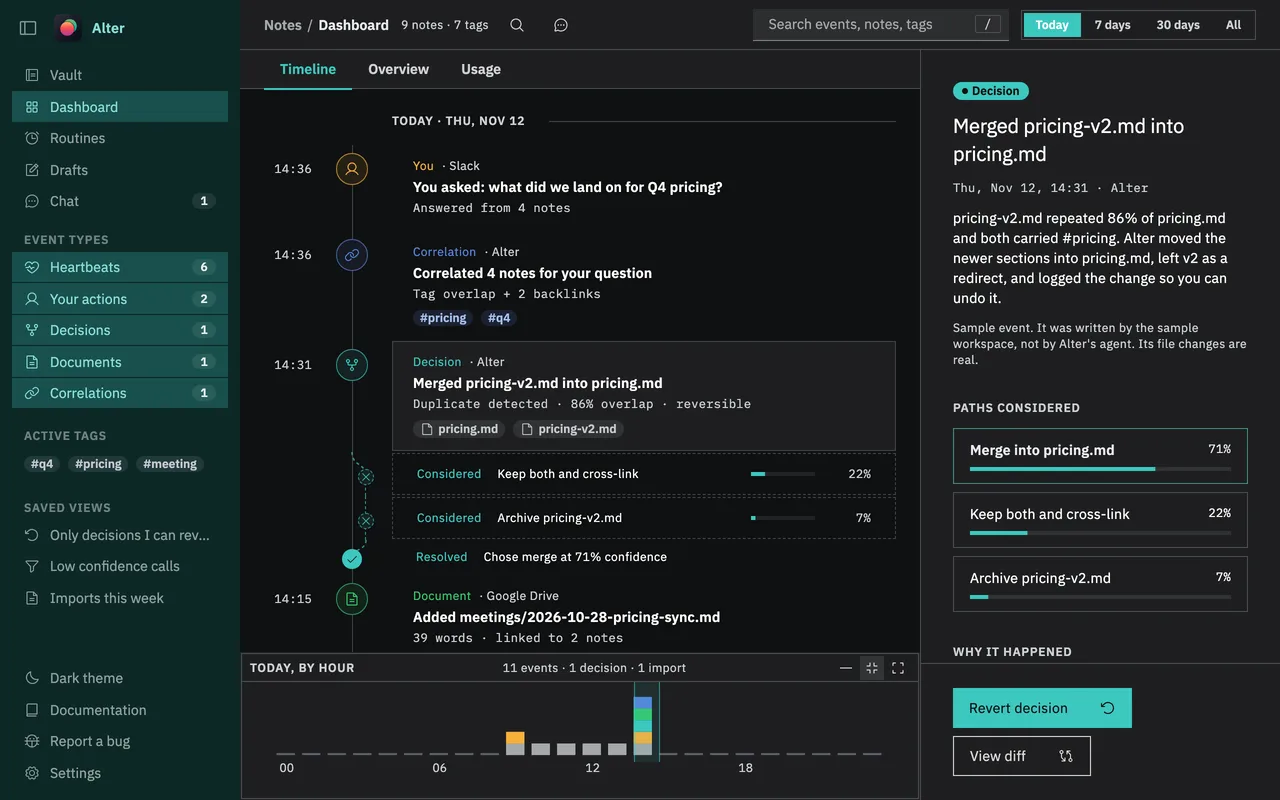
Alter's Dashboard on its Timeline tab in a sample workspace. A decision card reads: merged pricing-v2.md into pricing.md, with the paths Alter considered, why it happened, and a button to revert it.
  • For a full head

    Founders, CTOs and managers who say yes in a call and need it remembered.

  • Free beta

    Everything Alter does, free while it is in public beta. No account, no card.

  • Your machine

    A Mac with Apple Silicon or Intel, or Linux, a Raspberry Pi included. Plain Markdown in a folder you choose.

  • Your yes first

    Anything that leaves your machine waits for you to approve the exact action.

Watch it work

Watch Alter work.

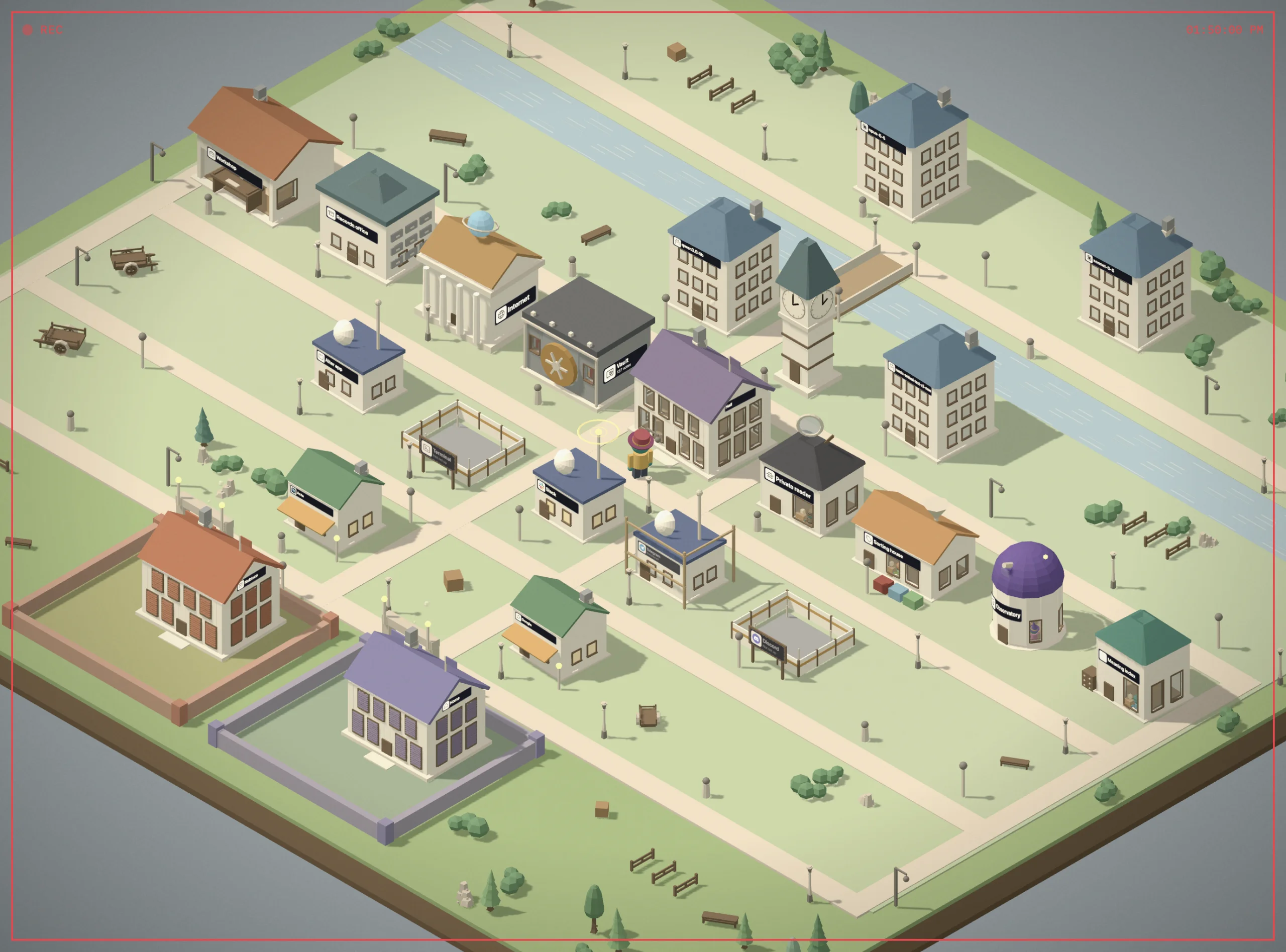
Ask something, and watch your assistant go to work in a small town of its own. It walks to your notes, your mail and the model that thinks it through, then back to Slack with the answer. Pick any of today's runs and watch it again, step by step.
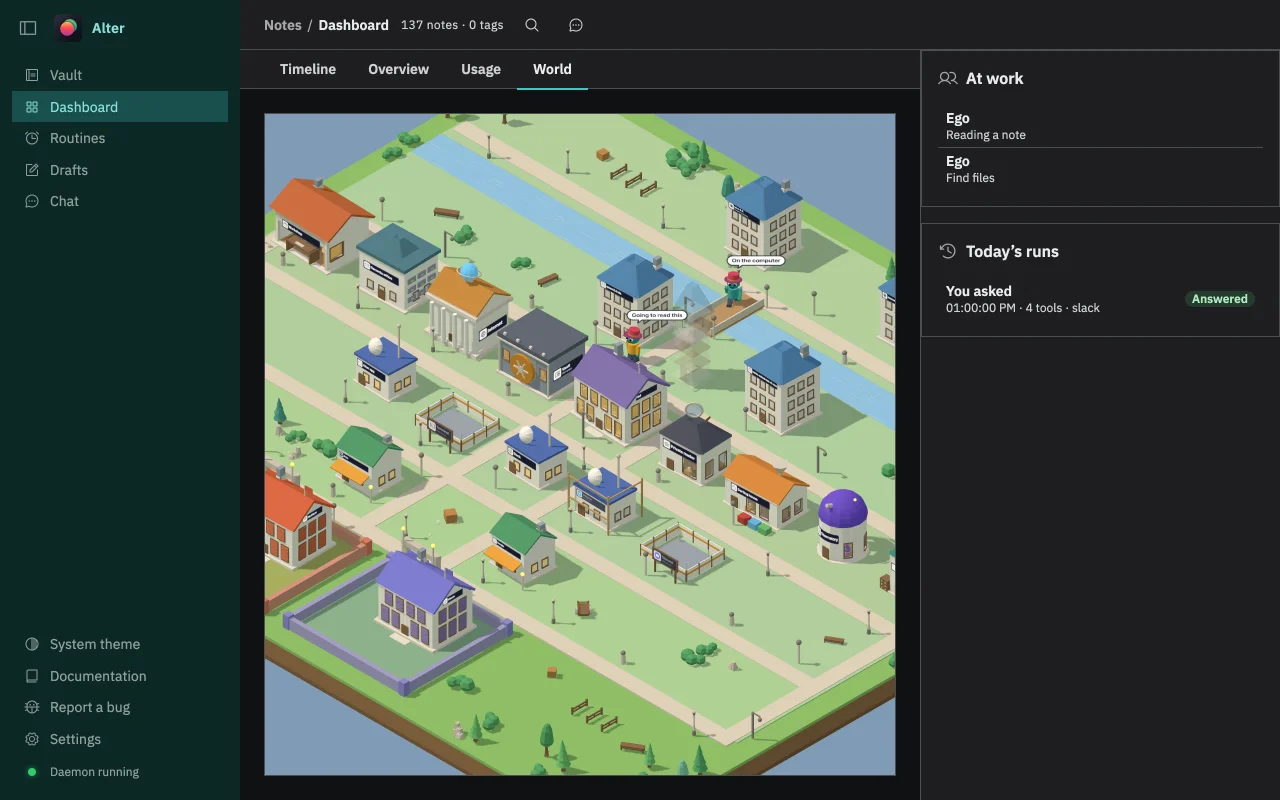
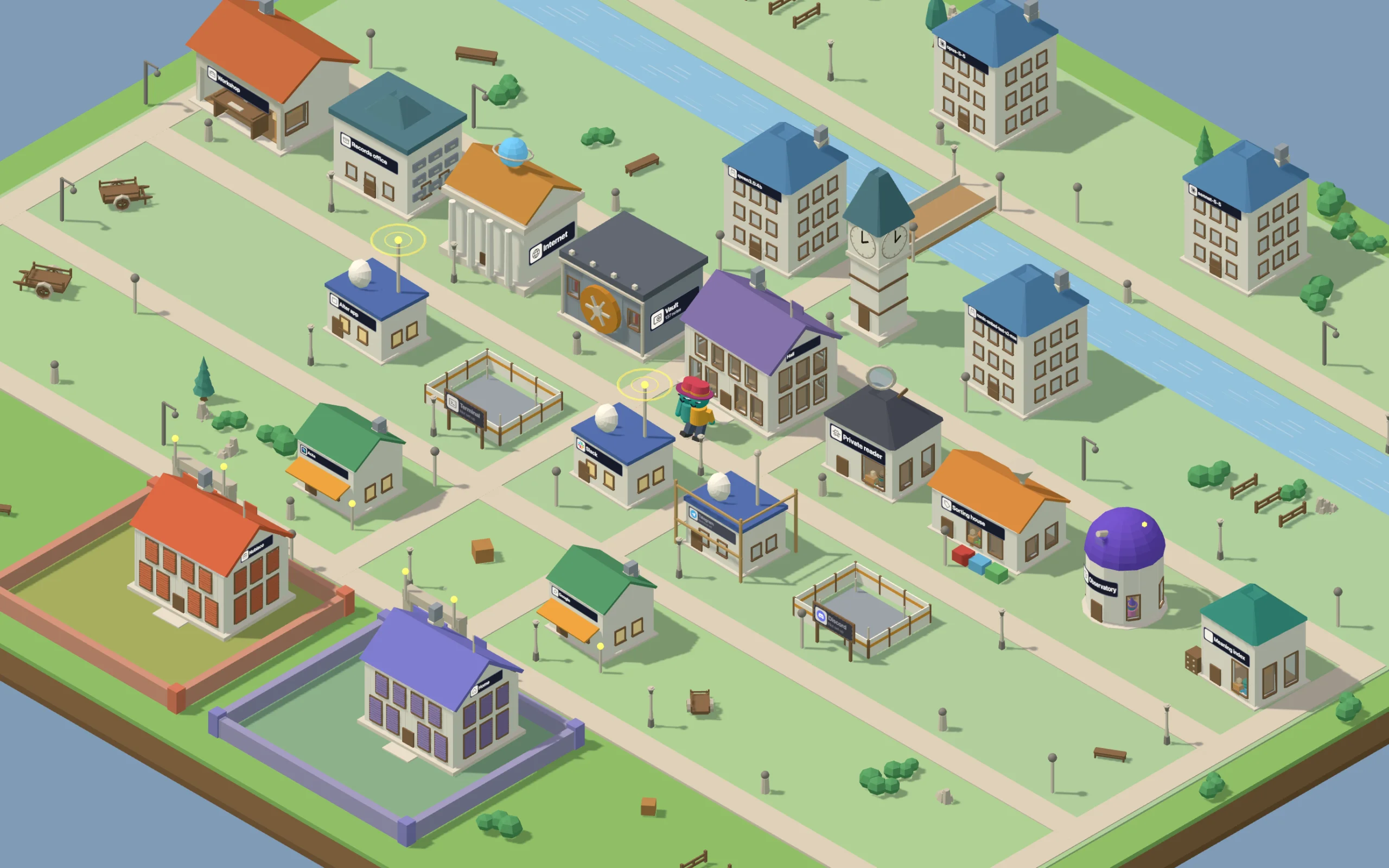
Alter's World in a sample workspace: a small isometric town where Ego walks between buildings for notes, mail and models, with a few words over its head saying what it is doing.

Live

As it happens.

Each step is a walk across town, with a few words over its head saying what it is doing. Ask two things at once and two workers set off.

Alter's World live: two of Ego's turns at once, each walking between buildings with a few words over its head.

Replay

Any run, replayed.

A run replayed in Alter's World, with the recording look: grain, a red frame and REC, the camera following Ego.

Pick one of today's runs and watch it again, step by step, like a recording.

Your setup

Your setup, as a town.

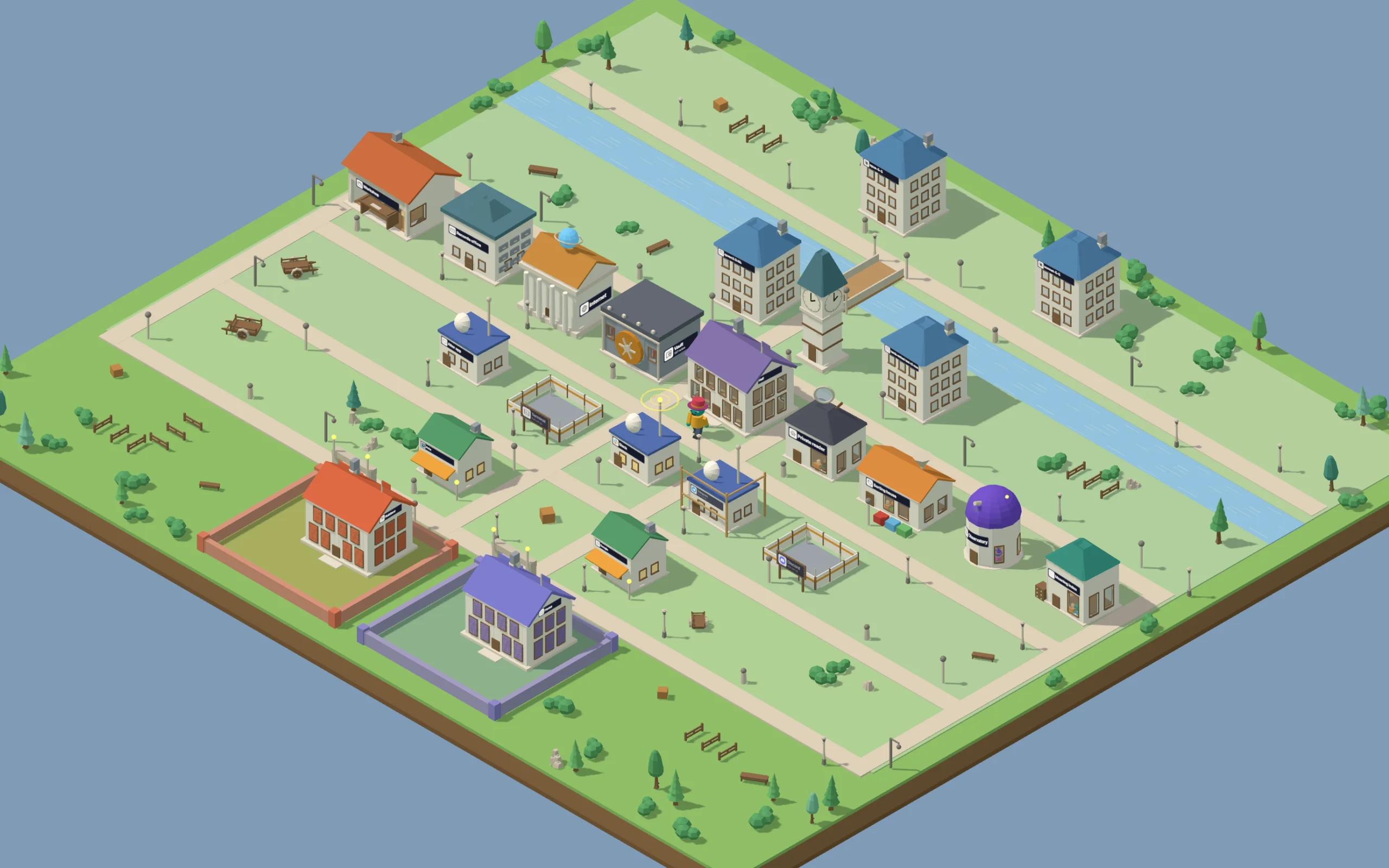
Every model, channel and source you connect is a building. Models on your Mac stand in town, cloud models stand across the river, and a channel you have not set up yet is still a building site.

The town as Alter is set up, turning a quarter at a time: models in town and across the river, realms behind walls, channels not set up yet as building sites.

It remembers

Ask what you decided. It answers from your notes.

Tell it a decision, a name, a promise. Weeks later, ask in Slack, Telegram, Discord or your terminal. It answers from the notes that hold it, and shows you the lines it used.

AlterSlack, direct message

You14:36

What did we land on for Q4 pricing?

AlterAPP

Two public plans stay. Annual billing arrives in Q4 at two months free, and Business is priced on request.

Answered from 4 notes

The 4 notes it read. Swipe through them.

  • pricing.md92%

    Pricing

    #pricing#q4

    Team

    29 per seat per month

    Q4 changes

    Annual billing at two months free

    A Business tier above Team, priced on request

  • meetings/2026-10-28-pricing-sync.md88%

    Pricing sync, 28 Oct

    #pricing#q4#meeting

    Decided to keep two public plans and add annual billing in Q4.

    Business stays priced on request.

    Annual billing: two months free.

    Revisit the Starter limit after the November numbers.

  • roadmap.md54%

    Roadmap

    #roadmap#q4

    Now

    Offline sync

    Annual billing (Q4)

    Next

    Business tier, priced on request

  • pricing-v2.md31%

    Pricing v2 (merged)

    #pricing

    Pricing v2

    Merged into pricing on 28 Oct. This note stays as a pointer.

It keeps order

Your notes keep themselves tidy.

Alter files, tags and merges your notes, as plain Markdown in a folder you choose. Every change lands on the timeline with its reason. One click puts it back.

Alter's timeline in the sample workspace: the merge decision, the paths it considered, and the Revert decision button.

Before, 14:30

  • pricing.md#pricing
  • pricing-v2.md86% the same
  • roadmap.md
  • meetings/2026-10-28-pricing-sync.md

After, 14:31

  • pricing.md+5 −1
  • pricing-v2.mdpointer
  • roadmap.md
  • meetings/2026-10-28-pricing-sync.md

Changes: Merged pricing-v2.md into pricing.md

pricing.md+5 −1 lines

---

title: Pricing

tags: [pricing]

tags: [pricing, q4]

---

…

## Team

- 29 per seat per month

- Shared views and an audit log

## Q4 changes

- Annual billing at two months free

- A Business tier above Team, priced on request

Changed its mind? One click on the timeline puts both notes back.

It asks first

Nothing leaves without your yes.

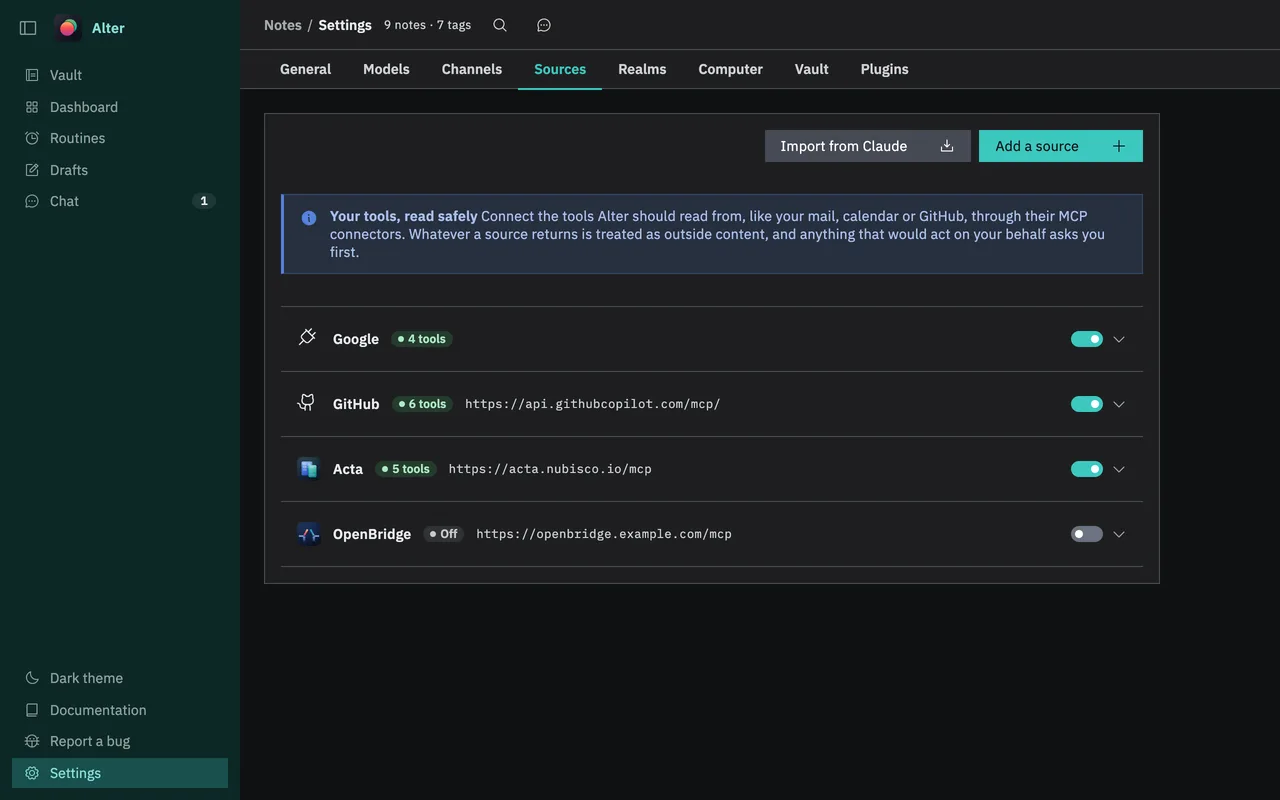
A strange email cannot give it orders. Anything that would act for you waits for your yes on the exact action, on your phone or your desk.

Alter's sources settings in the sample workspace: Google, GitHub and Acta connected, Import from Claude, and a note that anything that would act for you asks first.

AlterSlack, now

Approval needed: slack__post

AlterDirect message

You

Tell #team the Q4 pricing notes are ready for review.

Alter

I've asked for your approval to post in #team. It goes out once you approve.

Alter wants to post in Slack. Exactly this:

{
  "channel": "C07TEAM",
  "name": "team",
  "text": "The Q4 pricing notes are ready for your review."
}
ApproveDeny

A second brain that works, so yours can rest.

Plain Markdown on a Mac, a Linux box or a Raspberry Pi you own. Your own model account, or a model running on that machine.

Free during the public beta. Apple Silicon and Intel Macs, and Linux. Windows is coming.

A day with Alter

It does the reading.You make the calls.

Alter connects your mail, your calendar, your notes and the tools you work in, and reads them for you. You ask in plain words, wherever you are. Three moments from one day.

  1. 08:00Your inbox, read for you

    Start the day knowingwhat needs you.

    A morning brief where you already are: the mail that needs an answer, today's meetings, and the replies already drafted in your mailbox, for you to read and send.

    Routine: Morning brief, weekdays at 08:00

    alterGood morning. 3 of 41 new emails need you.

    1. Your accountant needs the Q3 invoices by Friday. Reply drafted.

    2. Sam at Acme asks to move Thursday's call to 15:00. Reply drafted.

    3. School: parents' evening on the 21st.

    alterToday: design review at 10:00, Acme renewal at 14:00.

    youremind me about the parents' evening the day before

    alterAdd "Parents' evening" to Reminders for the 20th?

    You tapped Approve

    Added. Two replies are waiting in your drafts.

  2. 13:45Before every meeting

    Walk in rememberingwhat you promised.

    Fifteen minutes before a meeting, Alter reads your notes and mail about the people in it and tells you where you left off. What you agree afterwards goes straight into your notes.

    Routine: Before each meeting, 15 minutes ahead

    alter14:00 Acme renewal, with Sam and Priya.

    On 12 Oct you promised Sam a usage report. Not sent yet.

    Priya asked about annual billing by email on Monday.

    Your notes: the renewal is 40 seats, up from 32.

    youdraft the usage report for Sam

    alterDrafted in your mail, with October's numbers from your notes.

    youwe agreed 10% off if they go annual

    Noted in clients/acme.md, with today's date.

  3. 03:12On call while you sleep

    The alert isalready looked into.

    Alter watches your alerts channel. When something fires at night, it checks the recent changes and your runbooks, and the findings are waiting when you look. It posts in the channel only after your yes.

    Watch: alerts, a new message at 03:12

    checkout-api: error rate 4.2%, threshold 2%

    alterLooked into it.

    It started at 03:04, 6 minutes after PR #812 was merged on GitHub.

    #812 cut the payment retry timeout from 30s to 3s.

    runbooks/checkout.md says: roll back first, then investigate.

    alterPost this summary in the thread?

    You tapped Approve

    Posted in #alerts. Nothing else was touched.

The morning brief and the meeting prep are two of 17 routine templates. Describe your own in plain words.

It shows its work

See what it did today, and what still needs you.

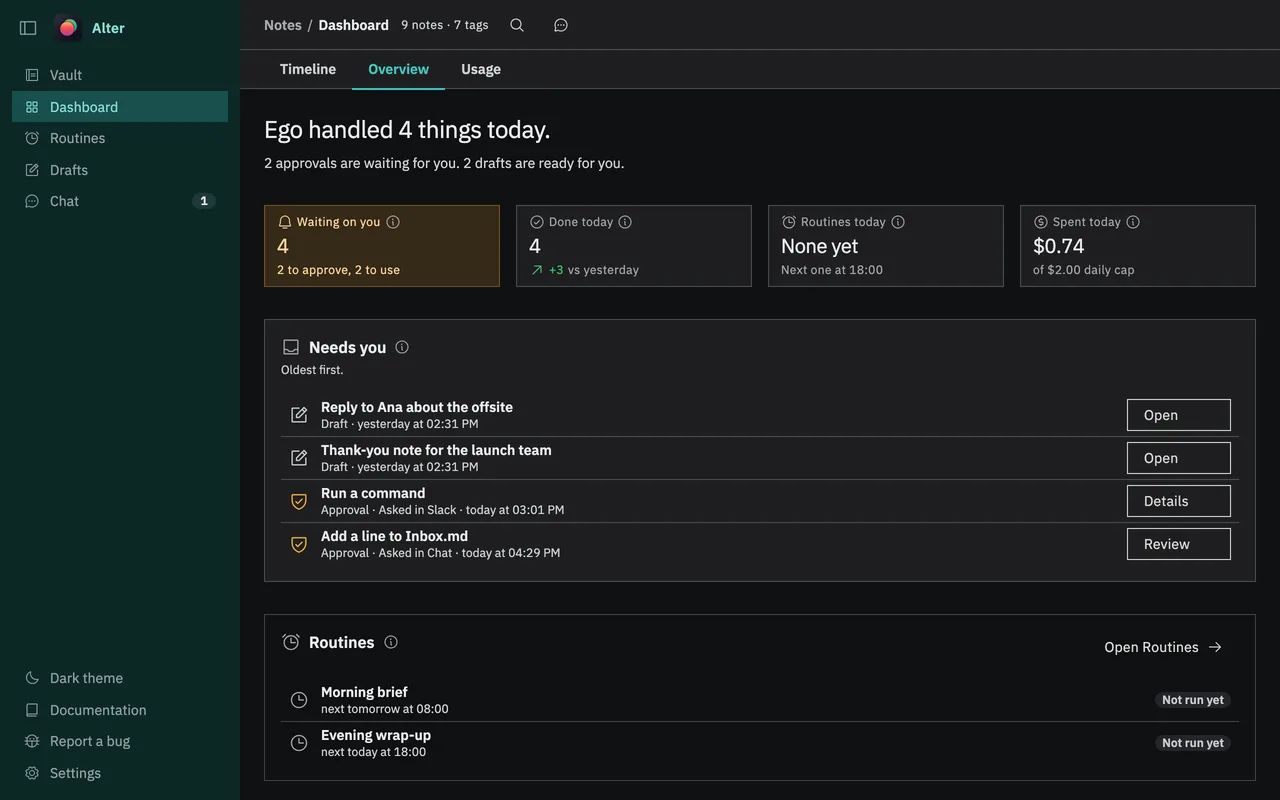
Alter opens on its timeline: every note it changed and every answer it gave, with the reason and an undo. The Overview says what needs you today, and every figure on it takes you to where you follow it up.

Alter's Dashboard Overview in a sample workspace: what Ego did today, four figures, what needs you, the routines and the week in a chart.

It counts the cost

Know what your models cost, model by model.

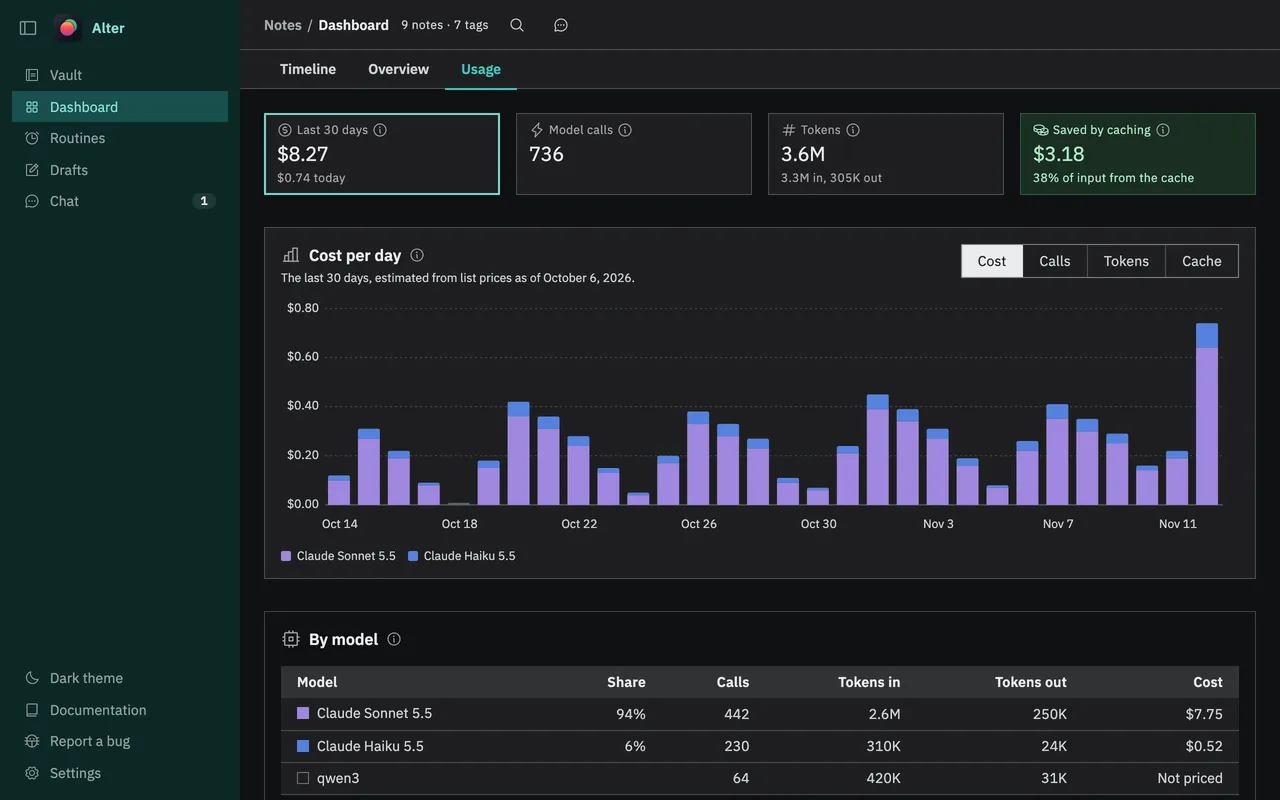
Usage charts what you spent each day of the last 30, each model in its own colour, with the calls, the tokens and what caching saved. Set a daily cap and Alter tells you when it is reached.

Alter's Dashboard Usage in a sample workspace: 30 days of cost per day, stacked and coloured by model, with calls, tokens and what caching saved.

Works with what you use

Your tools, your models, your rules.

  • Slack, Telegram and Discord

    Talk to Alter where you already are: your own Slack app, Telegram bot or Discord bot, paired with a one-time code and answering only you. Or chat in Alter's own app.

  • Any model you like

    Anthropic, OpenAI or any compatible service with your own account. Run local models with Ollama or LM Studio.

  • Bring your Claude setup

    Already set up tools in Claude Desktop or Claude Code? Bring them into Alter in one step. Their keys go straight to your keychain.

  • Any MCP connector

    Plug in any tool that speaks MCP, by address or by local command. Acta, GitHub, Notion, Linear and more are one click away. All of it is read under the same safety rules.

  • Routines, in your words

    Describe what you want and when: a morning brief, an evening recap, a quiet watch. Quiet hours included.

  • Mac, Linux and a Pi

    A desktop app for Apple Silicon and Intel Macs. On Linux, the same app in your browser, a Raspberry Pi or home server included.

Install

One line, on a Mac, Linux or a Pi.

Download the Mac app, or install Alter from the terminal on any Mac or Linux machine, a Raspberry Pi included. With Homebrew: brew install nubisco/tap/alter. Every way to install, step by step.

curl -fsSL https://downloads.nubisco.io/alter/install.sh | sh
alter service install
alter ui

Safety

A strange email cannot give it orders.

Outside content is kept apart from the part of Alter that decides what to do, and every action that would leave your machine waits for you. It holds even if the model is fooled.