Founders launch pricing

Built for real time. All of it.

A plugin host for stage and studio built around one rule: the sound never waits.

  • Rig viewSmooth at scale
  • Audio latency< 5 ms RT
  • Plugin formatsVST3, AU
  • PlatformsmacOS 11+
Buy now · from $99

Pay once, own it forever. One license per machine.

Try it free on macOS

Free for 30 days, no card needed.

Windows version planned

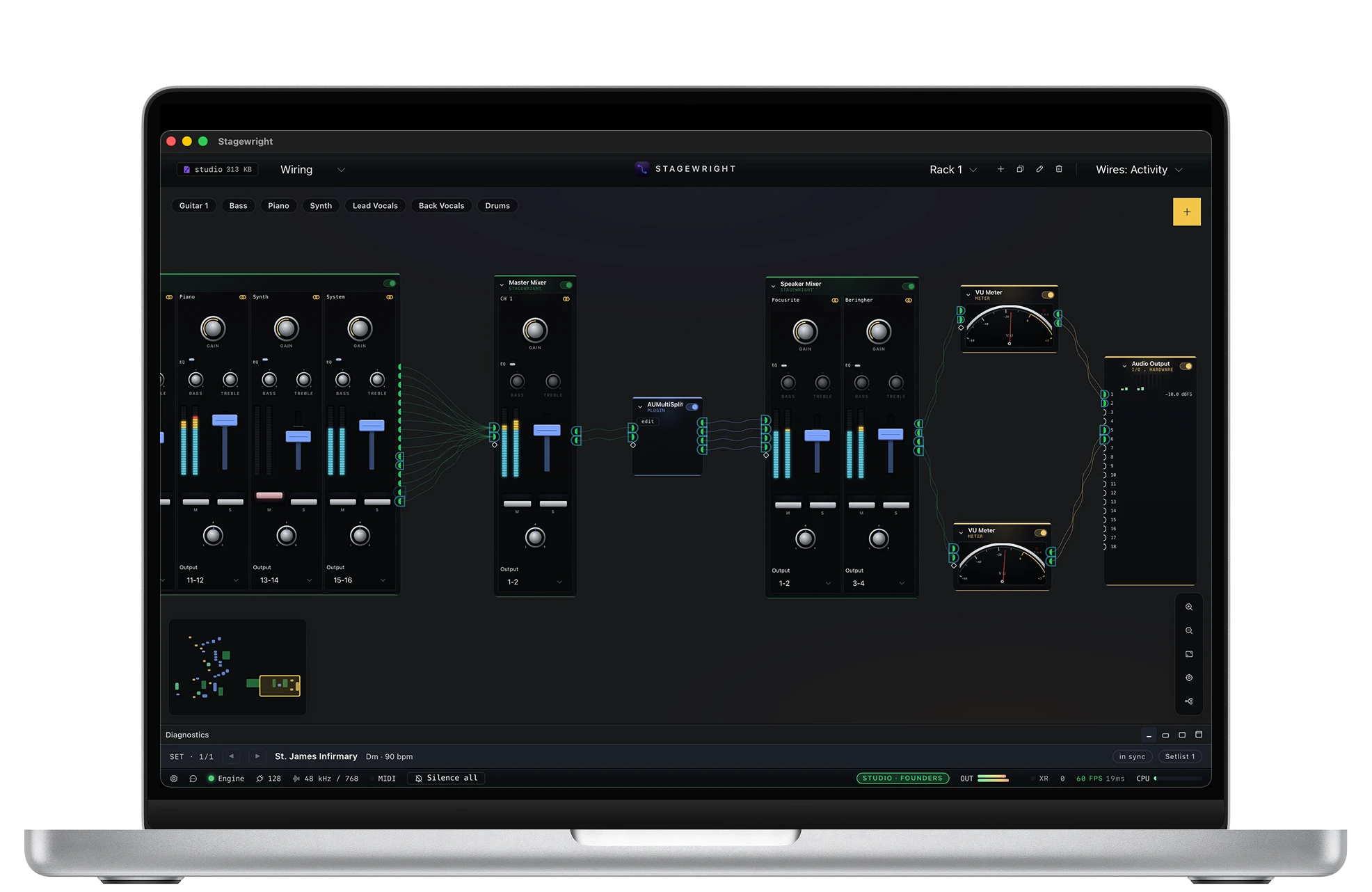
Stagewright Blueprint canvas with a Channel Mixer, VU and True-Peak meters, and signal generator wired across audio buses

Try it free on macOS

Free for 30 days, no card needed.

Performance

Measured, not promised.

  • The sound never waits

    Audio runs on its own protected engine, sealed off from the interface. Menus, meters, and screens can do what they like; your sound cannot be interrupted.

  • Smooth, whatever the rig

    Wire a real show into the blueprint, live meters on every cable included, and the view glides. Proven on rigs up to 18 outputs at 192 kHz, not just in the demo.

  • Light on your machine

    Opens in moments, sips memory, and leaves the headroom to your plugins. A live rig cannot afford a heavy app, so we did not build one.

In the studio

Made to navigate a serious rig.

  • The rack selector dropdown in the topbar, listing Generic and Studio A

    A rack per room

    Keep one rack for the home rig, one for Studio A, one for the touring board. A rack swap loads an entire signal chain, so it happens deliberately, between songs, and the setlist can do it for you.

  • The Wires menu offering Simple, Activity, and Levels views

    Find any signal path

    Wire views are built for tracing signal through a dense patch: Simple keeps the canvas tidy, Activity shows what is actually flowing, Levels flags the hot cable before your ears do.

License exclusive

Your front panel, on any screen in the room.

Every licensed install can serve the performer front panel over your own Wi-Fi. Open it in a browser on an iPad, a phone, or a laptop and it renders the real thing: live meters, tuner and metronome readouts, faders and buttons that work in both directions. Leave the computer by the amps and keep the controls on the mic stand.

  • Zero setup on the device

    Scan a QR code from Settings, or type a friendly your-mac.local address. A floating button takes the browser full screen. No app store, no install.

  • The desktop stays in charge

    While remotes are connected, the status bar shows a REMOTE chip with the device count, and it pulses whenever a change comes in from a remote.

The performer front panel running full screen on an iPad, with live meters, a keys rack, and an amp rack
An iPad in portrait showing a song's lyrics with chords above them and previous and next song controls

The setlist comes along.

Flip the remote into the lyrics reader and the iPad becomes a stage sheet: chords above the words, performance cues, and previous / next buttons that actually recall the song. Every screen in the room stays in step, because the desktop remains the single authority.

Included with every Stage and Studio license. Trial installs preview the feature with an unlock prompt.

Pricing

Two tiers. Both yours forever.

Pick the tier that matches your rig. Both are perpetual licenses covering one machine each: no subscription, no license server in the audio path, no account required to run. Founders is the launch price on either tier until January 1, 2027; after that, new purchases go to the standard price.

Stage

For solo and live performers

$99$149Founders launch price, perpetual

Everything a gigging performer needs. 48 kHz is the standard rate for live work, and a solo rig is not 32 channels.

  • 48 kHz audio engine
  • Up to 8 inputs / 8 outputs
  • Full Blueprint authoring and Performer view
  • VST3 and AU plugin hosting
  • Instant song recall and Variations
  • Songs and setlists with the ChordPro stage display
  • Remote front panel on any iPad, phone, or laptop over Wi-Fi
  • TypeScript scripting for show logic, safely sandboxed
  • MIDI Learn, scaling curves, hardware abstraction
  • Every 1.x release, free, forever
  • Founders keep the deepest discount on future major versions

$149 standard from January 1, 2027. License key by email within minutes; a one-time online activation binds it to your machine.

Studio

For studios and producers

$179$249Founders launch price, perpetual

Everything in Stage, plus the headroom recording work actually needs: high sample rates and high channel counts.

  • Everything in Stage
  • Full sample rates, up to 192 kHz
  • Up to 32 inputs and 32 outputs
  • Every 1.x release, free, forever
  • Founders keep the deepest discount on future major versions

$249 standard from January 1, 2027. License key by email within minutes; a one-time online activation binds it to your machine.

We're a small team and we price fairly. Please buy one license per machine: studios, that's one license for each machine you run. No account and no license server, just a one-time online activation per machine.

Pay once, own this version forever. Every 1.x dot-release is included. Major versions ship as separate paid upgrades with substantial discounts for existing owners. No subscriptions, no surprises. And if the price is genuinely out of reach for you, tell us through the contact form: we would rather see you on stage.

And the rest

Everything a working performer needs.

  • VST3 and AU plugin hosting

    Out-of-process scanning so a misbehaving plugin cannot take the engine down. CLAP support coming.

  • Songs & Setlists

    Snapshot your whole sound per song, arrange the set, and step through it hands-free, with ChordPro lyrics and chords on a stage display.

  • Hardware abstraction

    Compose at home, play at any venue. Logical control names map to whatever you have plugged in tonight.

  • Plugin manager

    Tags, favorites, blacklist, fuzzy multi-string search, and a per-project 'Plugins in Use' view.

  • Audio File Player (1.x)

    MP3, WAV, FLAC playback ships in a 1.x dot-release alongside backing-track features. Streaming and Rubber Band time-stretch arrive on the same track.

  • Local project files

    Project files are JSON on your disk. Sync them with git, Dropbox, or a USB stick. Your data, your tools.

  • System controls & Variations

    Panic, tap tempo, tuner, metronome, and master trim are first-class and bindable to a foot controller. Variations swap a rack's state instantly.

  • Native ARM and x86

    Native macOS 11+ builds for Apple Silicon and Intel. A native Windows version is planned.

Specs that matter on a stage.

Audio latency
< 5 ms RT
On a USB-class-compliant interface at 64 samples / 48 kHz.
Plugin formats
VST3, AU
CLAP at a later milestone. VST2 behind a flag for legacy patches.
Platforms
macOS 11+
Big Sur or later, Apple Silicon and Intel native. Windows version planned.
Reliability
Crash-isolated
The audio engine runs in its own process. A frozen editor or a bad plugin cannot stop the sound.

Minimum requirements

Operating system
macOS 11 (Big Sur) or later. A Windows version is planned.
Mac
Any Apple Silicon or Intel Mac. A native build for each, no Rosetta.
Disk space
Under 100 MB. Your plugins stay wherever they already live.
Audio hardware
Any Core Audio device, from built-in audio to a multi-channel USB interface.
Internet
Only for the one-time license activation. Stagewright runs fully offline after that.

Built for

Working musicians, not bedroom hobbyists.

  • The keyboardist who plays live

    Wants reliable patches, instant switching between songs and song parts, and a control surface that does the right thing the first time.

  • The studio musician at home

    Wants a flexible chain rig outside the DAW, for practice, jamming, and song sketches that do not need a timeline.

  • The hybrid producer and performer

    Wants a virtual rack that can be brought to a gig and also driven from a DAW over a virtual cable.

How it's licensed

Commercial, professional first.

Stagewright is commercial software. You buy a perpetual license, you own that version forever, and each license covers one machine. We sell it directly because we want studios and working musicians to fund a tool built specifically for them, and maintained for the long run.

  • One license, one machine

    Each license covers a single machine. Studios buy one license per machine they run.

  • Activate once, run offline

    Paste your key and a one-time online activation binds the license to your machine. After that Stagewright runs fully offline, and no license server sits in the audio path.

  • Move it yourself

    Switching machines? Release the license from the in-app license panel and activate the new machine, up to four moves a year. No support ticket needed.

  • Emergency offline token

    Dead laptop at a venue, no internet in sight? An emergency offline token keeps you playing for about 7 days, available up to twice a year.

FAQ

Questions performing musicians ask first.

  • What does Founders mean?

    Founders is the launch price on either tier: Stage for $99 (instead of $149) or Studio for $179 (instead of $249), available until January 1, 2027. You pay once, you own this version forever, and every 1.x dot-release is included. From January 1, 2027, new purchases go to the standard prices. Founders customers stay Founders, including the deepest upgrade discount on any future major version.

  • Why not a subscription?

    Because the people we built this for do not want to rent their tools. They bought a $3,000 laptop specifically so they would not depend on a cloud service during a show. You pay once, you own that version forever, no license server lives in the audio path. When a major new version ships you decide whether the upgrade is worth it. No automatic billing, no surprise expirations.

  • Do I need an account or an internet connection?

    No account, ever. You go online once per machine: paste your license key into the app and a one-time activation binds the license to that machine. From then on Stagewright runs fully offline, and no license server sits in the audio path. Need to switch machines? Move the license yourself from the in-app license panel, up to four times a year. And if you are ever stuck with no internet, say a replacement laptop at a venue, an emergency offline token keeps you playing for about 7 days, available up to twice a year.

  • Why not a DAW?

    Because a DAW is the wrong shape for live. No timeline, no clip arrangement, no comping. Stagewright does one thing: host plugins on stage, glitch-free, fast to author, fast to switch. We have no plans to grow into a recording suite.

  • Which platforms are supported?

    macOS 11 (Big Sur) and later, both Apple Silicon and Intel native. A Windows version is planned. Linux is not on the supported list for this version.

  • Which plugin formats?

    VST3 and AU. VST2 is behind a flag for legacy patches. CLAP support is on the roadmap.

  • Are the binaries signed?

    Yes. macOS builds are Developer ID signed and notarised by Apple (Team: Nubisco, LDA). Download the DMG, open it, drag Stagewright to Applications, and it launches with no security warnings and no workarounds. The planned Windows version will be code-signed as well. On first launch macOS asks for Microphone access, and for Screen & System Audio Recording only if you route audio through a virtual loopback device such as BlackHole; those are standard permission prompts, unrelated to code-signing.

  • Is there a trial?

    Yes. A free 30-day trial is available: the full Studio feature set on your real rig, with your real plugins. The one exception is the Wi-Fi remote front panel, which unlocks with a license. After 30 days the app locks to a limited state (48 kHz, 2 channels) until a license is entered, and everything you built stays in your project files, waiting for one.

  • How does the remote front panel work?

    Your licensed desktop app serves the performer front panel over your own Wi-Fi. Any browser on the same network renders the real thing: live meters, tuner and metronome readouts, and controls that work in both directions. You connect by scanning a QR code from Settings or typing a friendly your-mac.local address, and a floating button takes the browser full screen. Nothing to install on the device, and the desktop always shows a REMOTE chip while devices are connected. It is included with every license; trial installs preview it with an unlock prompt.

  • What if Nubisco disappears?

    Your work does not depend on us staying around. Project files are local JSON with an explicit schema version, so they keep opening with any tool that reads the format, with or without us. Your license is perpetual, and once a machine is activated the app runs fully offline, with no license server in the audio path, so a copy you bought keeps running for as long as your machine does. We are committed to not leaving paying customers stranded if the product is ever discontinued.

Be first on stage with it.

Try it free for 30 days on your own rig, or buy now with Founders pricing and get your license key by email in minutes.